This guide walks you through the process of transferring your domain ownership from Wix to GoDaddy, our recommended domain registrar. Please only follow these instructions if:
(1) You purchased your web domain directly from Wix when you created your site; and
(2) You plan to cancel your Wix account and exclusively use BeautyPro Funnels to host your websites, funnels, forms, etc.
Step 1: Request a Transfer Authorization Code (EPP Code)
The authorization code prevents unauthorized third parties from accessing your domain. We will need this code as proof that you have already approved (authorized) the domain transfer
In the top right corner of your dashboard, click on your name to expand a menu of options, as shown here:
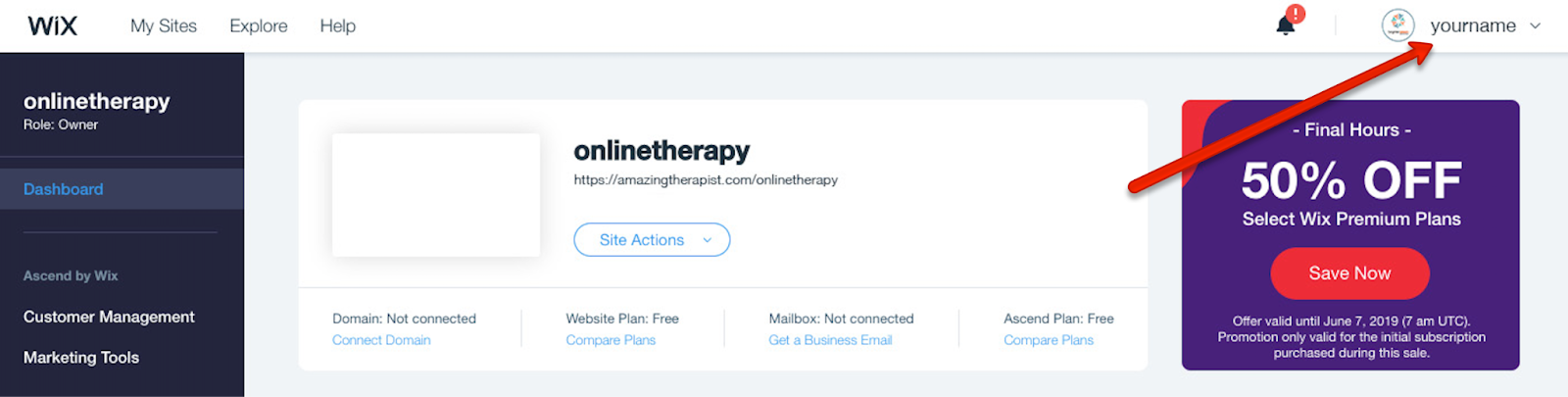
Click on Domains in that list, as shown below, to open up the My Domains page
Click the More Actions icon next to the relevant domain and select Transfer Away from Wix
Click Transfer Domain
Click I Still Want to Transfer
Within 24 hours Wix will send a transfer authorization code (EPP code) to your domain's registrant contact email address

Step 2 : Create Your GoDaddy Account
While you wait for your EPP code, create a GoDaddy account or login to your existing GoDaddy account
Step 3: Accept The Domain Transfer
Once you receive your transfer authorization code, login to your GoDaddy Account then complete the following steps:
Go to the GoDaddy transfers page and search for your domain.
Make sure your domain is unlocked. GoDaddy will show a green status bar if we can verify your domain is unlocked.
Refresh the unlock status by clicking Unlock Status, and GoDaddy will re-check the unlock status.
Enter the authorization code for your domain.
Select Continue after the unlock and auth code sections both show green status bars.
Note: If you selected Refresh Status, you might be moved to the next step without having to select Continue.
Choose an option for Domain Protection and then select Add Protection. If you prefer not to add Domain Protection, select No Thanks instead.
Note: If you're interested in Domain Protection, we recommend NOT adding it until after you complete your BeautyPro Funnels set up.
Complete the checkout process to officially start your domain transfer.
Most domain transfers take 5–7 days to complete. GoDaddy will send you an email if we're unable to process your transfer, and you can check the status of your transfer any time in your GoDaddy account.
Going forward, you will renew your domain through your GoDaddy account.
Step 4 : Temporarily Point Your Domain To Wix
domain transfer is complete. This will allow us to temporarily "point" your web address to your Wix website.
Was this article helpful?
That’s Great!
Thank you for your feedback
Sorry! We couldn't be helpful
Thank you for your feedback
Feedback sent
We appreciate your effort and will try to fix the article